Home / Lessons

Module 1 – 010 Other Tools for Finding Viral Content Ideas


Module 1 -- 010 Other Tools for Finding Viral Content Ideas


Other Tools for Finding Viral Content Ideas

If you can’t afford BuzzSumo, you can use other FREE or Cheap Tools for finding great content ideas…

For Example:

Manually Spying on a Competitor’s FB pages daily – This works best ? and you get very accurate results and predictions. Just make a list of 10 competitors FB pages and check them daily for most shared articles/images/videos…..

Google Keyword Planner – FREE tool provided by Google, very accurate, but for getting exact numbers you need to run some campaigns with small daily budgets. But you can do a topical search and see the most searched keywords/phrases per topic, and you can include those in your titles and articles you publish on your website.  You can also get some content ideas you never knew were that popular. Trending for the last 12 months is very useful. Video Explanation

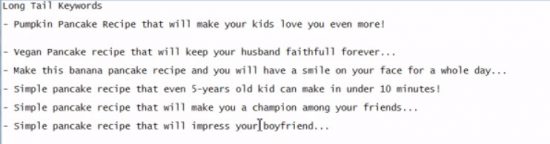
We search for example for recipes – we see what is the most searched recipes…and we come up with titles of this style…
Question & Answer Sites – Yahoo Answers & Quora – Those questions that keep coming again and again, those are the ones you need to cover on your website. Video Explanation

Amazon.com – Categories…Best Sellers – you can write about these items and even Earn with referring people to Amazon to buy this item or anything else – you get percentage of the sale, if someone you referred bought something in the next 24 hours. They have a nice affiliate program.

You can write in this style – as you have bought the product yourself – and you have enough amazing information – from the reviews of the people who already bought the item.  You can easily find images of the product on the product page or by Google Image Search. Video Explanation
Video-Alerts: Tool that costs $29.99 and never expires…It searches for new published videos on Youtube according to the predefined keywords. You will get a huge list, and you have to trim it or find someone to help you weed out the bad videos. Very Similar to Google Alerts but best tool for Youtube.com
Video Explanation

Subscribe to a newsletter to a popular topical websites/blogs similar to your niche. You can do a Google search for a keyword/phrase + magazine or blog and get a nice selection of websites. You get daily ideas from professionals in your field on what is popular at the moment.

Using Google Alerts for a certain Keyword/Phrase -- Video Explanation

Using Google Hot Trends for a certain Keyword/Phrase, and see top today’s news in USA…
Video Explanation
Module 1 – 009 – BuzzSumo – The Most Essential Social Media Tool – In Depth


Module 1 -- 009 -- BuzzSumo – The Most Essential Social Media Tool -- In Depth


BuzzSumo – The Most Essential Social Media Tool -- In Depth

As I said the in the previous lessons, BuzzSumo is really essential tool for growing your FB Page, succeeding in FB ads and getting fresh content ideas, you know your FB audience will engage with.

When we load the program, we see several tabs: Projects, Most Shared, Trending Now, Backlinks, Content Analysis, Facebook Analyzer and Question Analyzer.

With Projects you can define some keywords or phrases and follow you predefined set of URLs and how they perform in terms of getting likes, shares, tweets. You really doesn’t need this option unless you are working with huge number of clients and you are a large scale agency.

Most Shared – this is a very useful option – you just enter a keyword/phrase, define time range for search and immediately, you are presented with articles which are sorted by most shared, Re-tweeted articles, the ones with most Pinterest shares and most Backlinks .

We can use the information contained in these articles and make similar ones, use even better version of the title and you are good to go – You know your content is going viral.

You can also search by domain – which is a very nice way to spy a competitor(s) and see what is performing best there.

At the right side, you can do a bunch of filtering options – including Language of the article, Country TLD, Word Count, exclude/include domains, Content Type…

As a special bonus, you can see the domains/pages linking to every article and backlink research.

Trending Now is another useful option. It gives you a perspective of what is popular right now (articles), sorted by social media activity, in the last 01-24 hours. You can choose Everything or go and search trending topical news.

Backlinks – self-explanatory, doing a deep backlink research – to a given URL, so you can do an SEO espionage or get an idea where to look for backlinks for your own domains.

Content Analysis – useful information – what type of content is popular for the keyword terms.
FB analyzer – one of my favorites, it searches the FB post by keyword/phrase or by FB page and sorts them by social activity. Ideal tool for social media espionage and unlimited content ideas for your FB page.

Question analyzer – I mentioned this in the previous video, in-depth. This tool is ideal for ideas & psychology for creating ads text, searching Issues, Problems, Troubles, Dilemmas, Obstacles, Doubt, Struggle. It searches Quora, Yahoo Answers, Forums…

Module 1 – 008 – Growing Your FB page – Size of Audience, Devices, Targeting


Module 1 -- 008 -- Growing Your FB page – Size of Audience, Devices, Targeting


Growing Your FB page – Size of Audience, Devices, Targeting

Hello guys, it’s Mirko…Here is another video for you.

One important advice I need to put an accent to…When going for likes, make sure the target audience is atleast 100k+ if possible. The bigger the better. 1M+ works best. Choose several targeting options to get close to this number.

Also, when starting be sure to choose ONLY MOBILE DEVICE, NEWS FEED. Skip desktop, you will get better results without it. We don’t need right side nor Facebook Audience Network ads.

When we adjust the pricing, we start slowly, and we never increase the ad spend of the original ad. When some ad is working the way we want, we then make a copy of it (EXACT CLONE) and choose another budget.

We do the same when we want to do SPLIT TESTING…. we don’t touch the original ad, because even a small change is resetting the performance and audience, and FB may never achieve the same results again.

MY advice is to start slowly, with $3, then when the ad is working clone it and continue with $10, $25 ads and then continue over $100 per campaign, when you want to scale the things quickly.

MY advice is to NEVER GO ABOVE $25 PER CAMPAIGN, and just make additional clones with a slight change, THIS WAY YOU ARE GETTING THE MOST OPTIMAL RESULTS.

Module 1 – 007 – Growing Your FB page – Posting Videos to a Related FB groups


Module 1 -- 007 -- Growing Your FB page -- Posting Videos to a Related FB groups


Growing Your FB page -- Posting Videos to a Related FB groups

Hello guys, it’s Mirko…Here is another video for you.

This time we will discuss how you can harness the power of never-ending stream of FB groups. With so many FB groups, it would be pity not to use their power to your advantage and convert some of their users into your fans. But you have to be very careful.

Rules to follow if you want to be successful in posting to a FB group.

-- Join a few groups a day
-- Never post in the same group everyday
-- If possible, use the FB profiles from your family members and join in different groups with them
-- Never share articles from just 1 websites – with articles, you get traffic to your website.
-- It is better to Make some great videos, either film it or make a Slide-Show and then share it to a THEMATIC FB Group – VERY IMPORTANT!
-- Sharing an awesome PHOTO – already posted on your Fb page to a correct, topical group is a Win-Win scenario, both for you and for FB group owner, and the audience.
-- Sharing a PHOTO ALBUM is also an AMAZING WAY TO GET ENGAGEMENT, rarely someone shares an ALBUM TO A FB PAGE, you will Stand Out.
-- Be sure to TAG YOUR FB PAGE over the photo/video/album posted in a FB group. THIS ENSURES you GET LIKES FROM THAT FB GROUP, while providing value.

Module 1 – 006 – Growing Your FB page – Boost Post & Invite


Module 1 -- 006 -- Growing Your FB page – Boost Post & Invite


Growing Your FB page – Boost Post & Invite

If you are starting with a really small budget like $1-2 per day, you can choose a different strategy.
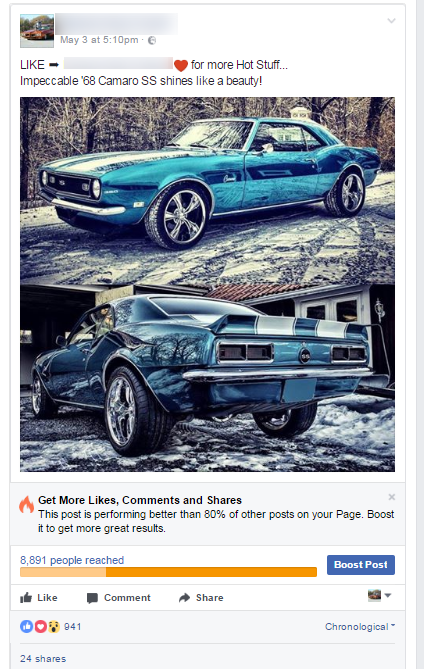
(I’ll show you the example from one of my previous campaigns with Car Related FB pages)

One quick tip: WHEN ADDING CONTENT FOR FB POSTS, YOU MAY HAVE NOTICED THAT IMAGES THAT ARE SQUARE OR TALL ARE GETTING BETTER RESULTS THAN THOSE IN WIDESCREEN DIMENSIONS.

For example, dimensions of 960x960px are getting the best results in my case.

When the height is bigger than width, you may experience even better results.

This is because most FB users are accessing FB on their mobile devices, and square/tall image occupy much bigger screen real estate. This leads to an increased chance in interaction with the post. Now you know why there are more and more square and portrait images/videos on Facebook.

The same applies for videos and slide shows used as videos. So, Keep This in Mind, as it can result in 20-30% increase in performance of the post.

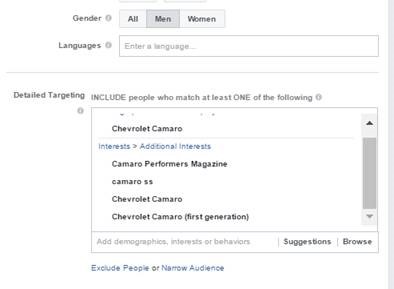
THIS METHOD involves choosing a SQUARE or PORTRAIT PHOTO and doing a Boost Post from your FB page -> and choose USA or whatever Country you need, then going for a laser-targeted audience, connected to the photo…

Example 1:  Muscle Cars


The car on the photo is 68’ Chevrolet Camaro SS, so I choose the following audience, get a huge number of likes and then INVITE the people to LIKE the page. The invites come from the page Itself not my name ?, so I use page & brand credibility. You can get 50-100 Likes for $1 for certain topics, that is $0.01-$0.02 per LIKE. But choose a very small budget, $1-$2 per day for this technique to work.

This strategy can be applied to any topic, but it is very important to be very engaging photo, (BuzzSumo ?) controversial, unique, maybe already proven on other FB pages before.

You need to test it and sometimes with larger budget you get better results, (FB is unpredictable I know ? )

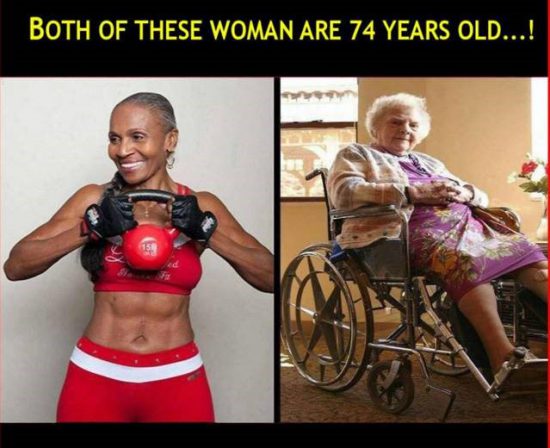
Example 2:  Health

In this case, you choose fitness women, fit women, women going to gym regularly, eating healthy, taking care of their lives…

You get crazy engagement, Likes and Shares, and you do Invite -- 50 People at a time, then wait 30 mins and continue for another batch.